Anonymous user
Title
Review.

View an ad to download for free

Open Desktop Authenticator (ODA) is a free, open-source Steam Guard authenticator for Windows. It is built for users seeking a maintained Steam Desktop Authenticator alternative, commonly called an SDA alternative, while keeping authentication data under local control.
KEY FEATURES
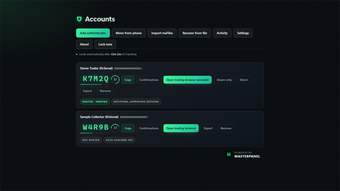
Store multiple Steam accounts in a local encrypted vault protected by a passphrase you choose.
Import existing Steam Desktop Authenticator maFiles without moving or modifying the originals.
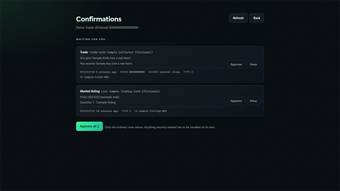
Generate Steam Guard login codes and view, accept or deny trade and Community Market confirmations.
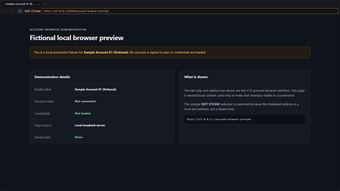
Open a separate signed-in Steam browser for each account, with isolated cookies and sessions.
Configure optional desktop notifications and per-account network routing or proxy support.
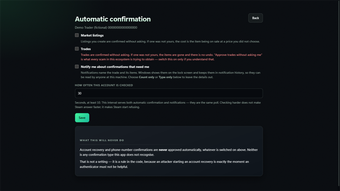
Enable auto-confirm separately for each account and confirmation type; it is disabled by default.
HOW IT WORKS
Create and unlock a local vault, then import existing SDA maFiles or add accounts through Steam. ODA generates authentication codes on your computer and connects directly to Valve for Steam operations, using any route or proxy you configure. Locking the vault closes ODA browser windows and ends their Steam sessions.
PRIVACY AND SECURITY
ODA requires no ODA account and has no ODA backend, cloud sync, telemetry, advertising or paid tier. Account secrets remain in the passphrase-protected vault on your device. Confirmation notifications are optional, with selectable detail, and automatic confirmations are limited to trades and Community Market listings.
The project is MIT licensed and developed in public. Source code, release checksums, CI build provenance, the documented threat model and build instructions are available in the official GitHub repository, giving users a transparent way to inspect the code and verify downloads.
WHAT'S NEW IN VERSION 1.5.1
Version 1.5.1 introduces digitally signed and timestamped Windows installers and a shorter, clearer Windows app name. It retains the version 1.5 features: an isolated browser with a separate signed-in session for every account, optional confirmation notifications, per-window routing choices and safer handling when a Steam authenticator change has an uncertain outcome. If Steam may already have completed an action, ODA stops and asks the user to check the account instead of encouraging a risky retry.
SYSTEM REQUIREMENTS AND AVAILABILITY
The Windows edition supports Windows 10 version 1809 (build 17763) or later and Windows 11. This Softonic download is the x64 installer. ARM64 builds are available separately through the official GitHub Releases page. Linux packages are distributed separately through the official GitHub Releases page. Every ODA feature is free; there is no premium edition.
IMPORTANT LIMITATIONS
ODA confirms activity that the user has already initiated; it does not provide market, inventory or trading automation. There is no cloud recovery, so users remain responsible for their vault passphrase and backups. The official Windows installers and portable executable from version 1.5.1 are digitally signed and timestamped with MASTERPANEL LLC as the verified publisher. Signing helps verify publisher identity and file integrity, but does not guarantee that Windows SmartScreen will never warn. Microsoft Store packages are re-signed by Microsoft.
Open Desktop Authenticator is independently developed, owned and published by MASTERPANEL LLC. It is not affiliated with, endorsed by or sponsored by Valve Corporation. Steam and Steam Guard are trademarks of Valve Corporation.
Free
1.5.1
Windows
Windows 11
English
10
100.78 MB
View an ad to download for free
1 reviews
Review.

Comment.

Trusted

Keep your computer safe from unwanted users

Software for Enhanced Folder Protection and Privacy

Comprehensive protection for the modern digital age

Monitor With Ease

Hide any window, program, browser or game in the background with one click or hotkey.